Built for aircraft builders

Build it. Log it.Keep it flying.

RivetLog is the builder’s log that never has to be retyped. Track every task, part and inspection while you build. When the aircraft is finished, every installed part carries straight into your maintenance records.

Invitation-only beta. Request your place below.

  • Task checklist, hold points, parts and budget for the whole build
  • Finish the build and every installed part carries into maintenance
  • On your phone, tablet and computer, with nothing to install
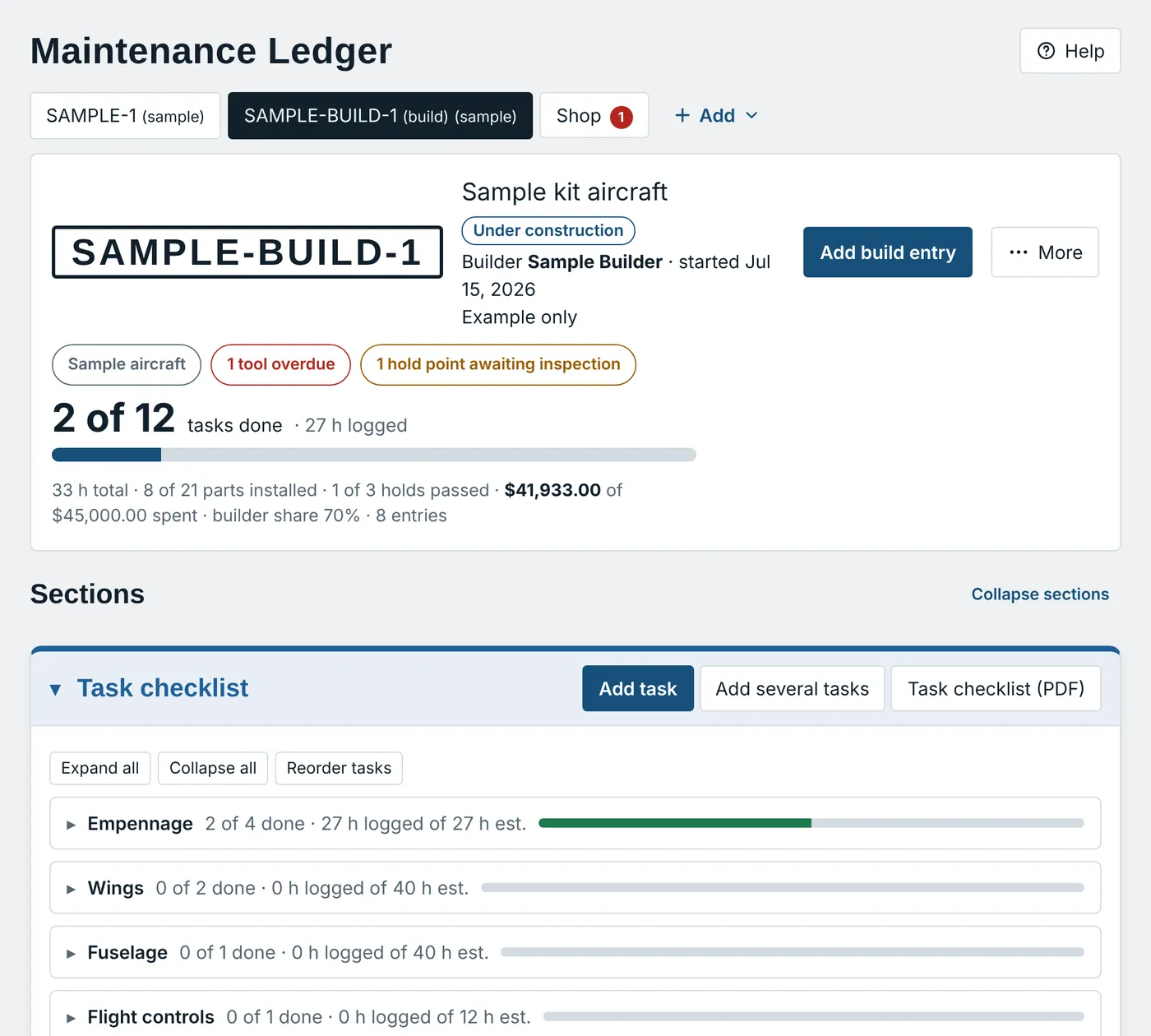
The RivetLog build screen for a sample kit aircraft: two of twelve tasks done with a progress bar, parts installed, inspection holds passed and money spent against the budget, above the task checklist.
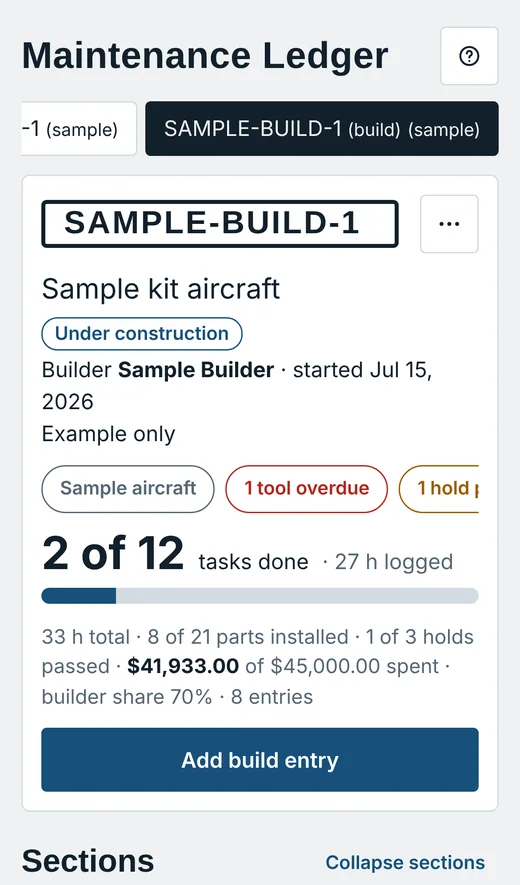
The same build on a phone, with the progress bar and the add build entry button.
  • Build log to maintenanceOne record, no retyping
  • Hold points, signed offInspector, date and findings
  • Parts, cost and budgetFrom ordered to installed
  • Print-ready PDFsA4, landscape or portrait
The difference

Your builder’s log shouldn’t end when the build does.

Builder’s logs and maintenance logs are usually two separate products, so the day you finish building is the day you start retyping. RivetLog is one product for both. Every part you installed follows the aircraft from the workshop into service.

1While you build
A build in progress: tasks done, parts installed and the task checklist.

Tasks, hold points, parts, photos and budget

2Once it flies
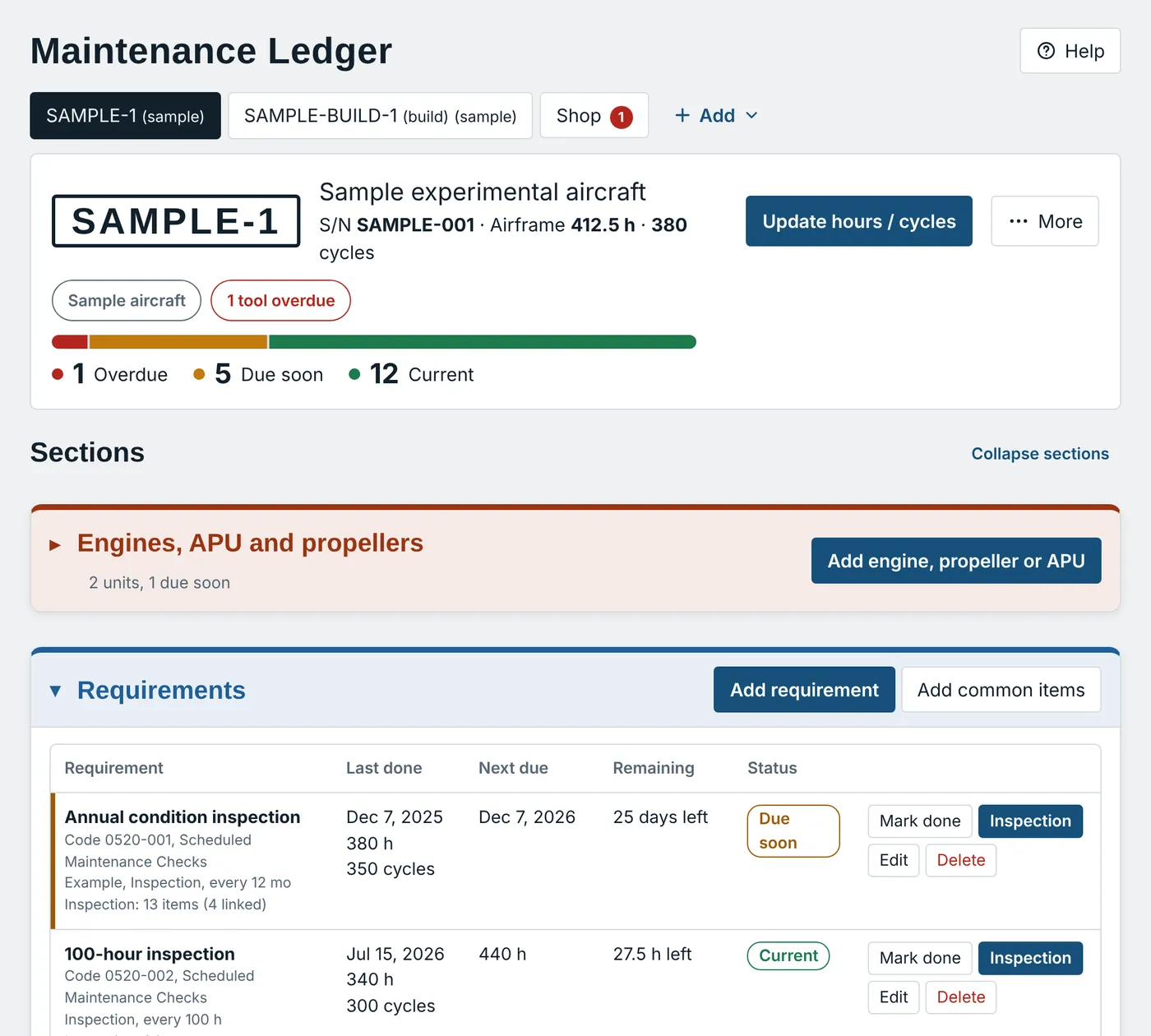
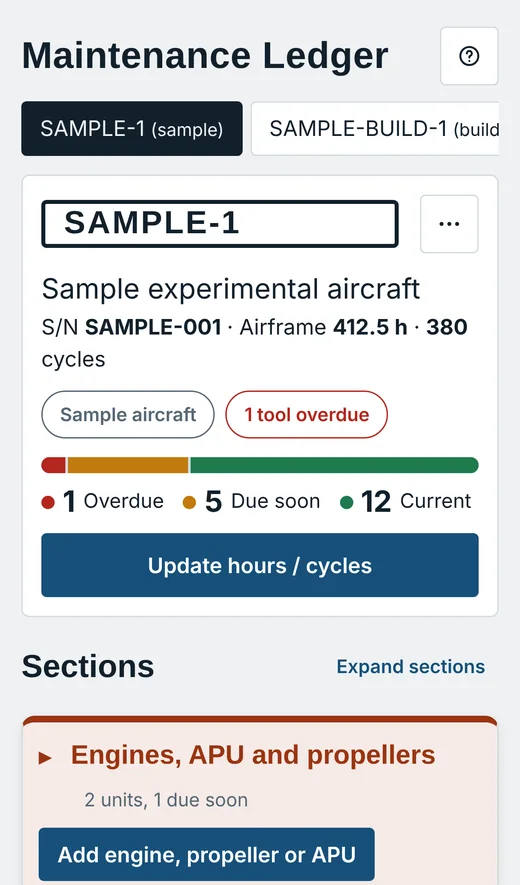
The same aircraft in service: a status bar of overdue, due soon and current items above its requirements.

Due dates, logbooks, work cards and reports

What carries forward when you finish the build

  • Every installed part you choose, with its part number, serial number and JASC code
  • Engines and propellers, as units with their own logbooks
  • Your build hours, as one summary logbook entry or a copy of every build log entry
  • An optional maintenance template with your recurring inspections
  • Your weight and balance, photos and the whole build record, kept with the aircraft
  • An undo, right after, if you change your mind
While you build

Track the build, task by task.

Work through your checklist by section, log your hours with photos, and keep inspection hold points with the inspector’s name, date and findings. Everything you record is the start of your aircraft’s history.

  • A task checklist by section, with estimated and logged hours
  • Each task linked to its tools, parts and documents
  • Inspection hold points, signed off by the inspector
  • A build log with hours, photos and who did the work
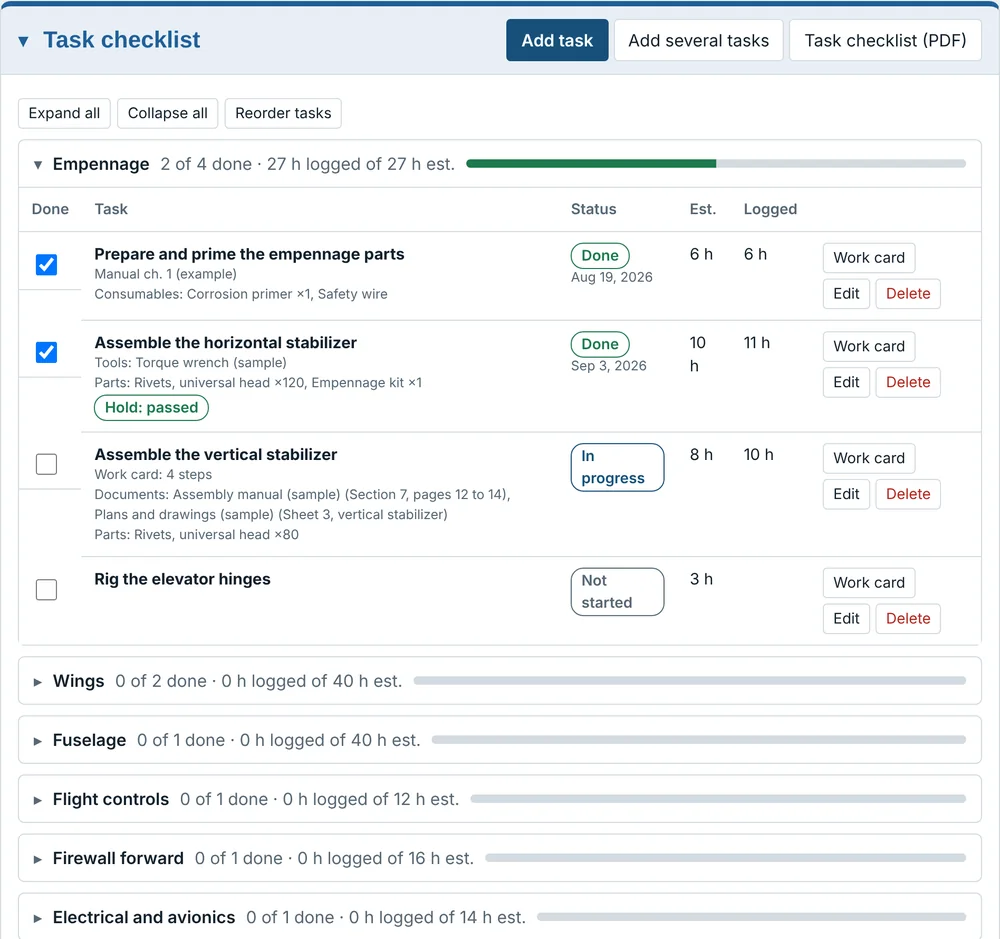
The task checklist with the empennage section open: tasks marked done or in progress, with estimated and logged hours and the parts, tools and documents each task uses.
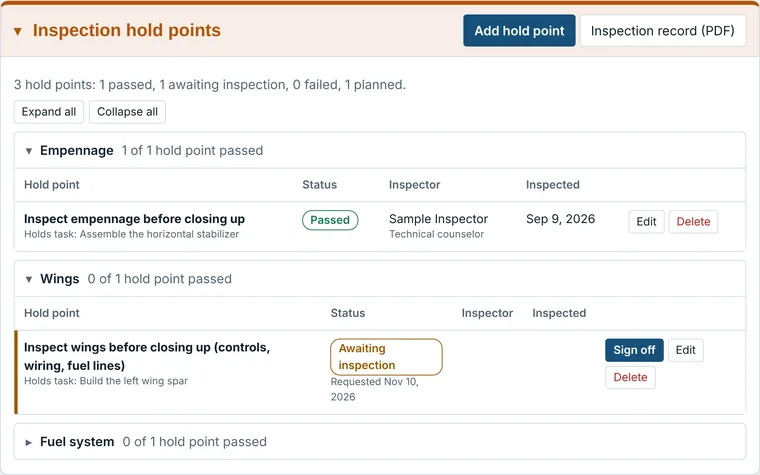
Inspection hold points: one passed with the inspector’s name and date, one awaiting inspection with a sign off button.
While you build

Every part, every dollar, every shelf.

Follow each part from ordered to received to installed. Group by aircraft system or by where it’s stored, watch shelf-life dates, and see the cost against your budget at a glance.

  • Ordered, received, installed and expiring, at a glance
  • Part and serial numbers recorded once, carried forward later
  • Group by system, by location, or as a flat list
  • Cost by category and total against your budget
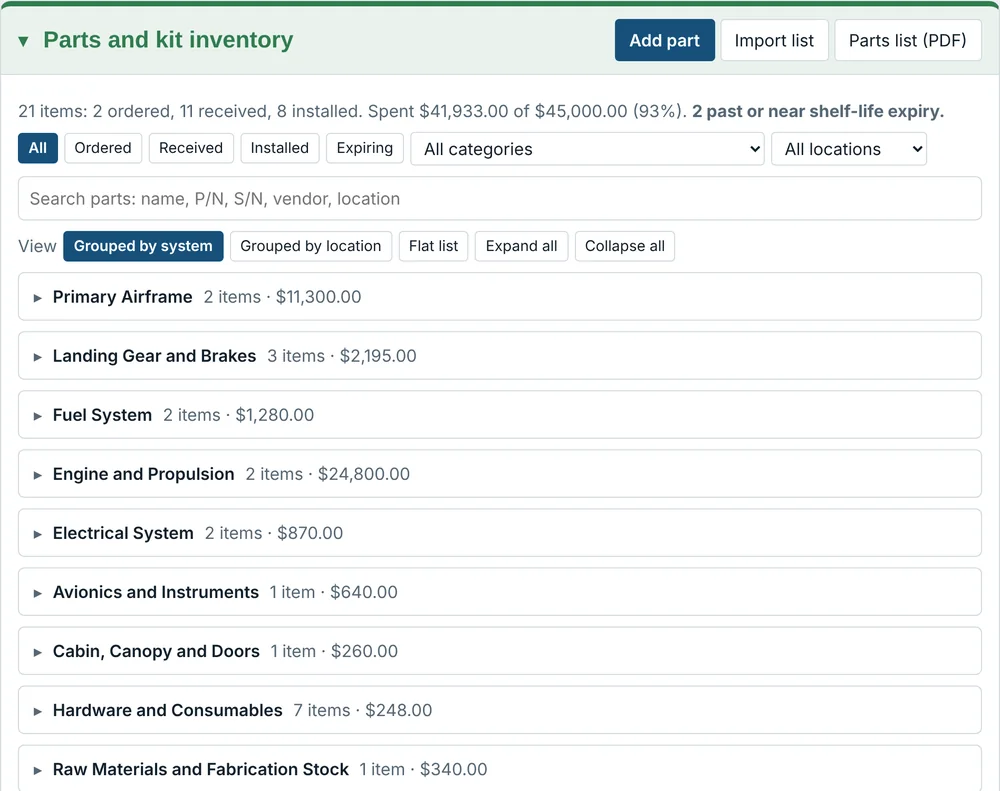
The parts and kit inventory panel: twenty-one items, two ordered, eleven received, eight installed, with the total spent against a forty-five thousand dollar budget and parts grouped by aircraft system.
The handoff

One button turns the build into a maintenance record.

When the aircraft is finished, choose the parts that stay on it and press Finish build. Each becomes an installed part ready for its times and limits, so nothing is typed in twice.

  • You choose what stays; consumables and raw stock remain in the build record
  • Engines and propellers become units with their own logbooks
  • Your build hours become a logbook entry, in the form you pick
  • Add each part’s times and limits in one screen
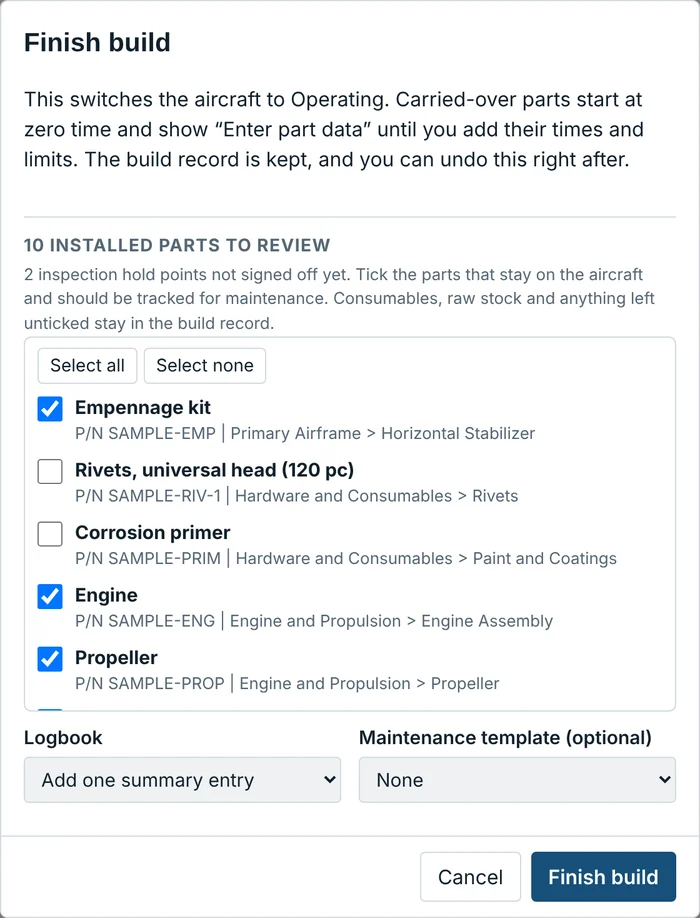
The Finish build screen: a list of ten installed parts with tick boxes for the ones that stay on the aircraft, and choices for the logbook entry and an optional maintenance template.
Then keep it airworthy

Every due date, worked out for you.

The parts you carried over now have intervals and limits. Tell RivetLog how a requirement repeats. It tracks the airframe, each engine and propeller, and every component with a limit, and shows what is overdue, due soon or current.

  • Hours, calendar months, cycles, or the earlier of two
  • A first interval, then a different repeat interval
  • Life limits: time since new, since overhaul, calendar life
  • Directives and service bulletins alongside your inspections
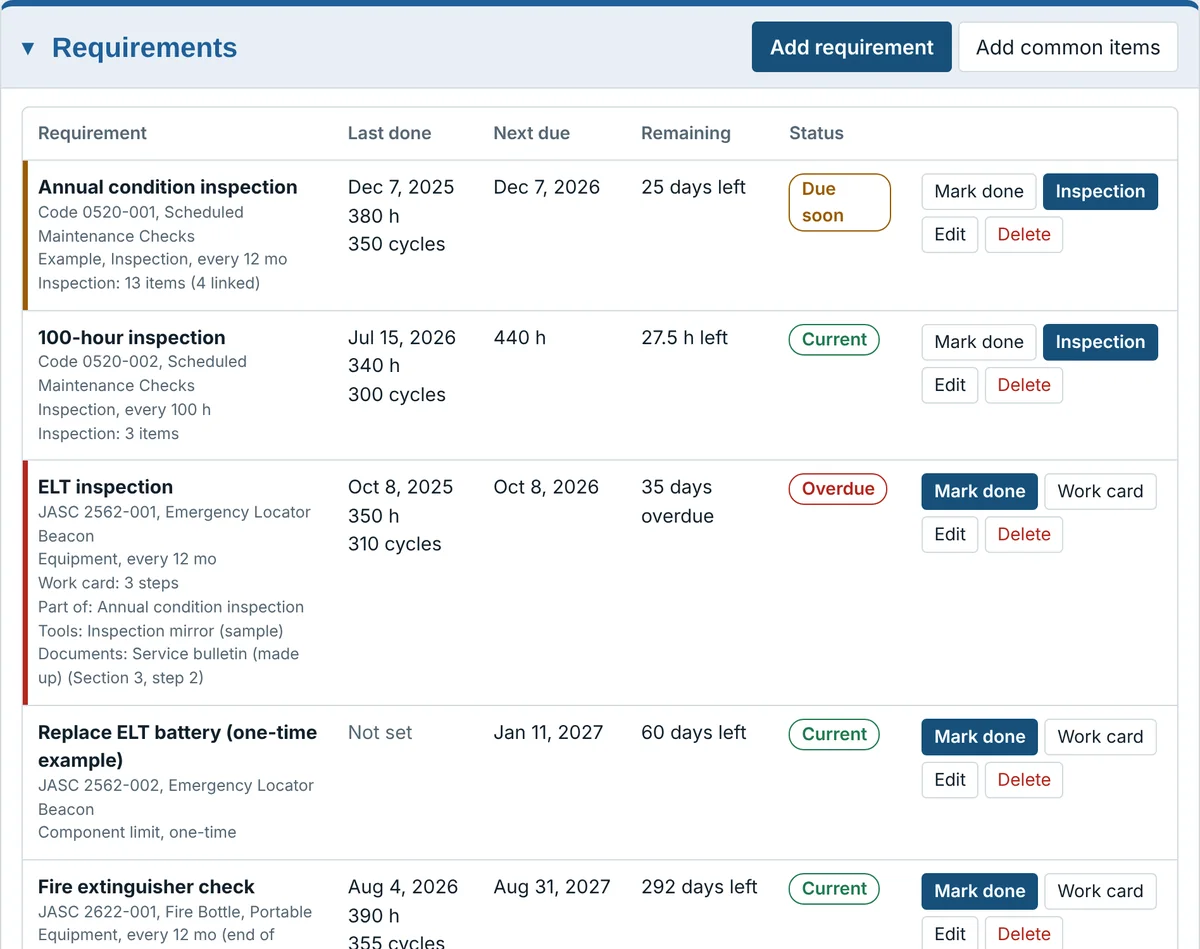
A table of requirements showing the annual condition inspection due soon, the 100-hour inspection current, and the ELT inspection overdue, each with last done, next due and time remaining.
Do it once, record it right

Work cards that carry the warnings with them.

Write a job as steps once. Each card lists its warnings, tools and documents, then the steps, with places to record values such as torque as you work.

  • Warnings, cautions and notes that can’t be missed
  • Tools required, with their storage place and calibration
  • Documents to have open before you start
  • A blank card as a PDF, for the bench
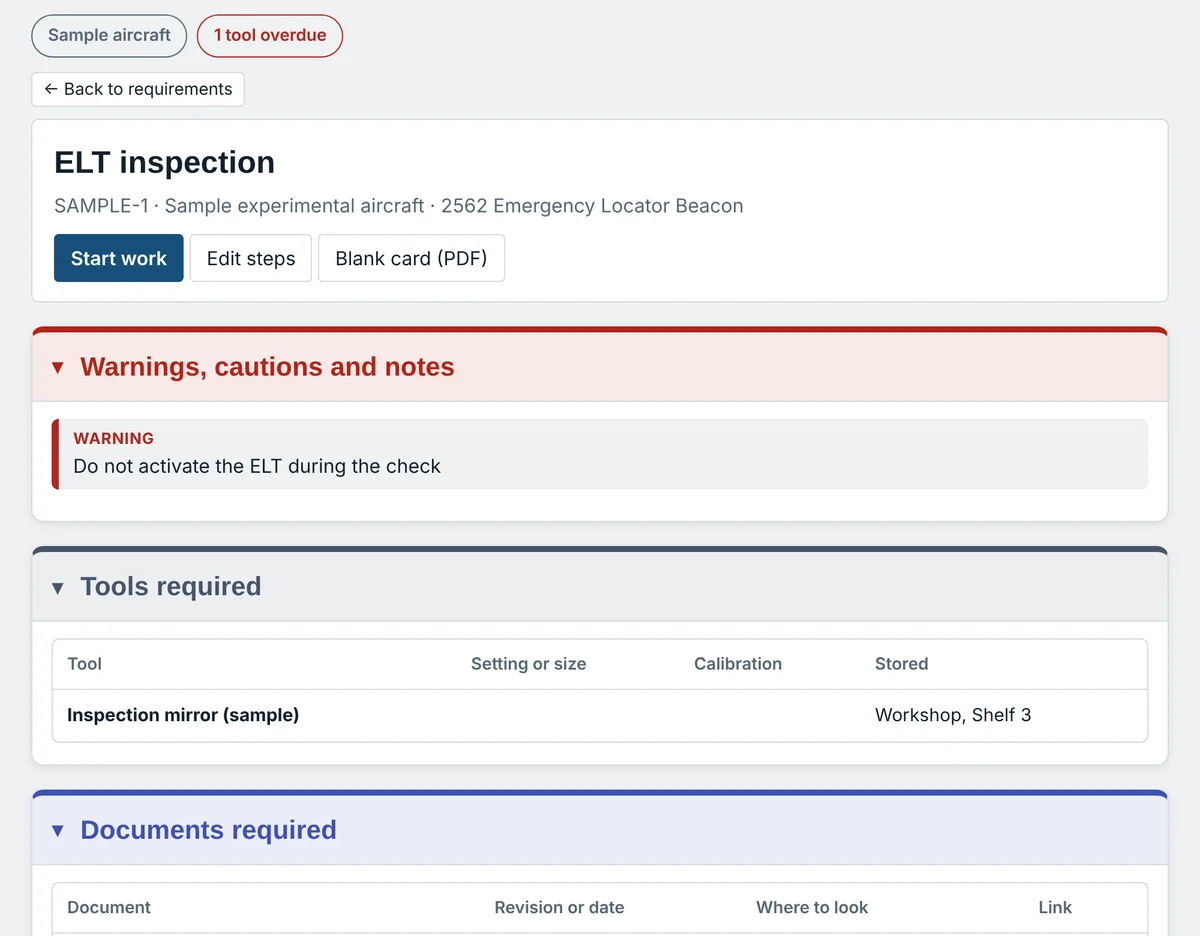
A work card for an ELT inspection with a red warning, a tools required table and a documents required section.
Weight and balance

Weigh it once. It follows the aircraft.

Enter your weighings and equipment changes, then plot your loading scenarios against the CG envelope. Each scenario is checked and flagged as within or outside limits.

  • Empty weight and CG from your weighings
  • Loading scenarios, each flagged within or outside limits
  • The envelope chart in the app and on the PDF
  • Your choice of units
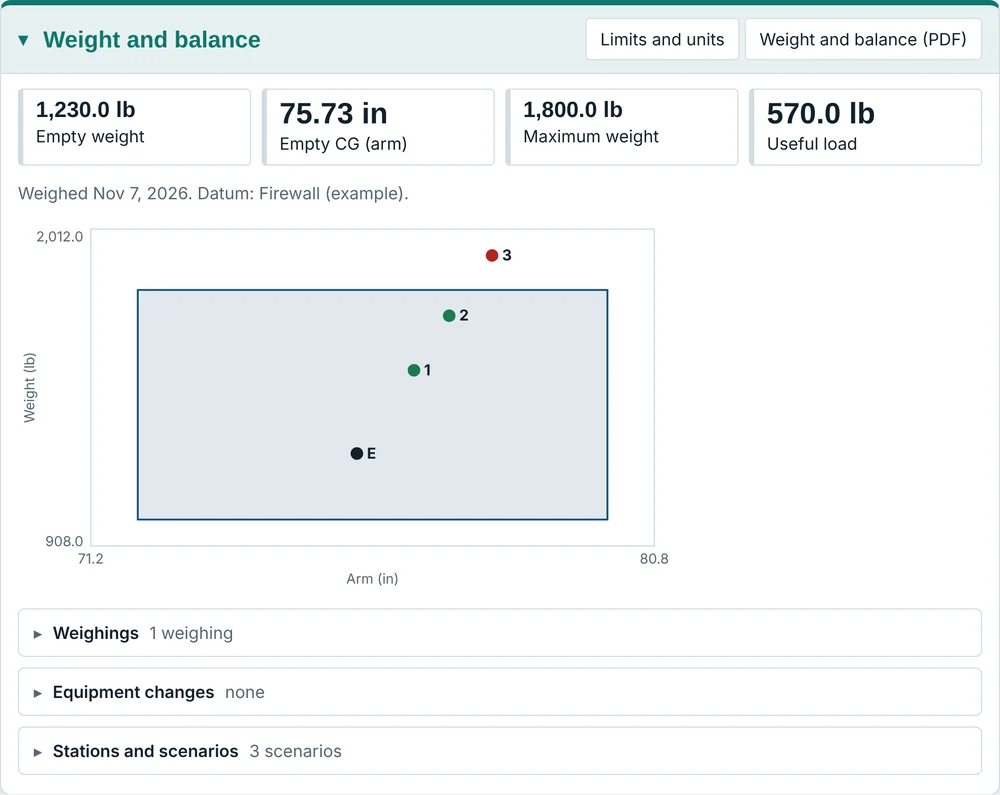
The weight and balance panel showing empty weight, empty CG, maximum weight and useful load, with a CG envelope chart and plotted loading points.
Paper still matters

Reports that look like you meant it.

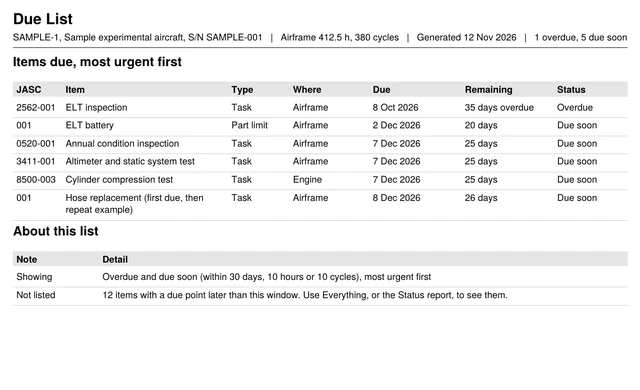
Print the status of everything, a due list for the weeks ahead, or separate airframe, engine and propeller logbooks. Choose A4 landscape or portrait, and the tables adjust to fit.

  • Status report and due list
  • Airframe, engine and propeller logbooks, together or apart
  • Weight and balance report with the envelope chart
  • Task checklist, parts list, photo and build log PDFs
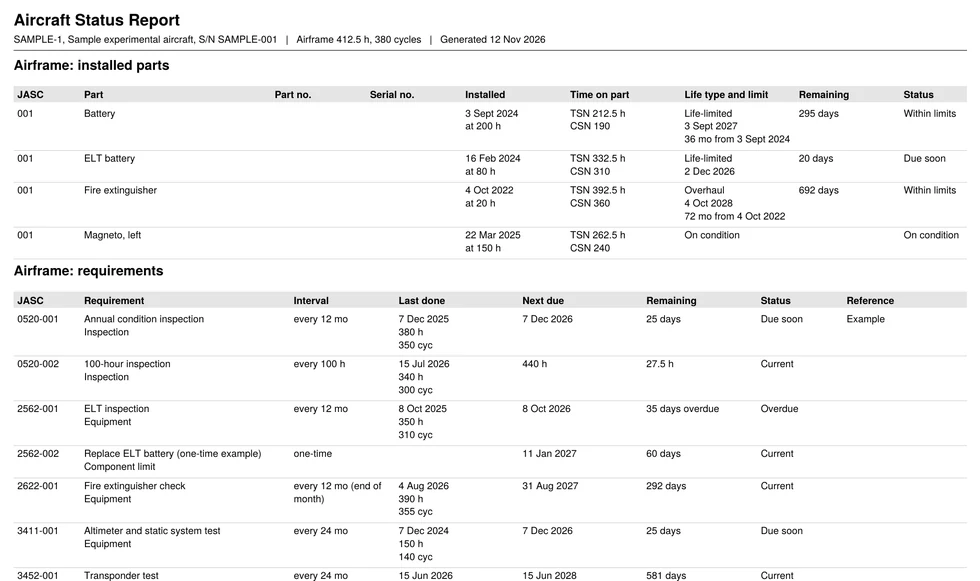
A landscape Aircraft Status Report PDF listing installed parts and requirements with their remaining time and status.
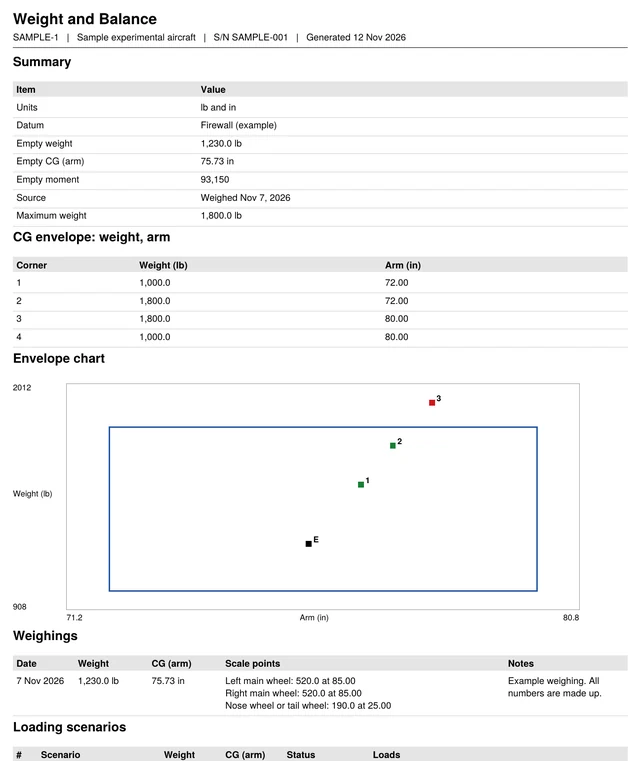
A portrait Weight and Balance report with the summary table and the CG envelope chart.
A Due List PDF showing the items due soonest, most urgent first, with the overdue ELT inspection at the top.
Pocket-sized

Take it to the workshop.

RivetLog runs in your browser, so there’s nothing to install. Add it to your home screen, log the hours and snap a photo of the work, and it’s waiting on your computer when you sit down.

  • Large buttons and a layout built for a phone
  • Photos from your camera, resized and stripped of location data
  • Synced across your devices once you’re signed in
A build project on a phone, showing tasks done and a progress bar.
An operating aircraft on a phone, with its status bar.
The details

The things builders and mechanics ask about.

Not just a checklist and a calendar. RivetLog speaks the language of the workshop and the hangar.

Task checklist

Break the build into sections and tasks with estimated hours, then tick them off as you go.

Inspector sign-off

Hold points record who inspected, when, and what they found.

Kit and parts inventory

Ordered, received, installed and expiring, with part and serial numbers kept for later.

Budget tracking

Cost against budget by category, so the build never surprises your wallet.

Builder share of the work

Record who did each hour, and see what share of the build you did yourself.

Photos everywhere

Attach pictures to tasks, parts, hold points and log entries, with a gallery and a photo PDF.

Carried forward

Installed parts, engines and propellers, and your build hours move into maintenance with one button.

Life limits and directives

Time since new or overhaul, calendar life, directives and service bulletins, once you’re flying.

Tools and shop warnings

Calibration due dates for your tools, and warnings you write once and attach to any work card.

How it works

Get started in three steps.

Request an invitation

RivetLog is invitation-only while we’re in beta. Tell us who you are and we’ll be in touch.

Start your build

Add your aircraft as a build, list the tasks and parts, and log hours and photos as you go. Already flying? Add it as an operating aircraft instead.

Finish the build, keep flying

One button carries the installed parts into maintenance. RivetLog then works out what’s due and prints the reports.

Straight talk

Honest about what it is.

RivetLog does the arithmetic and keeps the records tidy. The decisions stay with you.

RivetLog is

  • A planning and recording tool that follows your aircraft from build to maintenance.
  • Built to sit beside your official logbooks, not replace them.
  • Yours to back up: download all your records any time.

RivetLog isn’t

  • A substitute for your plans, manufacturer data, maintenance program or aviation authority.
  • An authority on which intervals apply. You set them; RivetLog counts them.
  • The official record of your aircraft. Your signed logbooks remain the record of truth.

Requirements and intervals differ by country, aircraft type and operation, so check them against your authority and your maintenance program.

Questions

Good questions.

Who is RivetLog for?

Builders of amateur-built and kit aircraft first, and then the owners and mechanics who keep those aircraft airworthy. RivetLog follows the aircraft from the first task on your checklist to its latest logbook entry. If your aircraft is already built, add it as an operating aircraft and start from there.

What happens when I finish my build?

You choose which installed parts stay on the aircraft and press Finish build. Each one becomes an installed part with its part number, serial number and JASC code, and engines and propellers become their own units. You pick whether your build hours become one summary logbook entry or a copy of every build log entry, then add each part’s times and limits in one screen. You can undo it right afterwards, and the full build record stays with the aircraft.

Does RivetLog replace my logbooks?

No. Your signed logbooks remain the official record. RivetLog does the arithmetic, keeps your working records in order, and prints reports to sit beside them. Check what your authority requires you to keep.

How are due dates worked out?

Every requirement has the intervals you give it: hours, calendar months, flight cycles, or more than one, in which case the earliest wins. You can set a first interval and a different repeat interval. Components with life limits count time since new or since overhaul.

Do I need to install anything?

No. RivetLog runs in your web browser on a phone, tablet or computer. You can add it to your home screen for one-tap access.

Where are my records kept?

On your device, in your browser. Once you sign in, they’re also copied to your own account so your other devices stay in step. You can download a full backup at any time.

Does it work without a signal?

RivetLog needs a connection to open. Once it’s open, you can keep working if the signal drops: your changes are saved on the device and sync when the connection returns.

Is it approved by an aviation authority?

RivetLog is a planning and recording tool. It doesn’t decide what your aircraft needs, and it isn’t a substitute for your plans, your maintenance program or your authority’s requirements. Your signed logbooks remain the official record.

What does it cost?

Pricing hasn’t been announced yet. RivetLog is invitation-only while it’s in beta.

How do I get in?

Request an invitation below. Access is by invitation while we’re in beta, and you sign in with the Google account you were invited with.

Join the beta

Request an invitation.

RivetLog is invitation-only while it’s in beta. Leave your email and tell us about your build. We’ll write when your invitation is ready.

We’ll use your details only to contact you about RivetLog. See the privacy page.

Thank you.

Your request is in. We’ll email you when your invitation is ready.